Terminal Subsystem Architecture
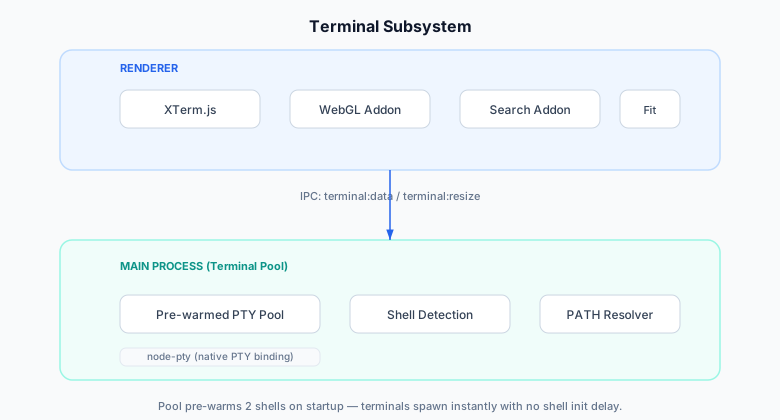
The terminal subsystem provides a full-featured terminal emulator within Crab Desktop. It manages PTY processes, handles shell environment detection, implements split panes, and integrates with the broader application through shell integration and command detection.
System Overview
PTY Pool
The terminal pool pre-warms shell processes on app startup to eliminate the 200-500ms shell initialization delay when the user first opens a terminal.
Pool Configuration
| Parameter | Value | Rationale |
|---|---|---|
| Pool size | 2 | Covers most immediate needs without waste |
| Shell | $SHELL or /bin/zsh | User's configured shell |
| Columns | 80 | Default; resized on attach |
| Rows | 24 | Default; resized on attach |
Pool Lifecycle
App Start
    │
    ├─ Spawn PTY #1 (idle, waiting for attach)
    ├─ Spawn PTY #2 (idle, waiting for attach)
    │
User opens terminal
    │
    ├─ Attach PTY #1 to XTerm instance
    ├─ Resize to actual terminal dimensions
    ├─ Spawn replacement PTY #3 (refill pool)
    │
User opens second terminal
    │
    ├─ Attach PTY #2 to XTerm instance
    ├─ Spawn replacement PTY #4 (refill pool)
Shell Environment
On macOS, GUI applications don't inherit the user's shell PATH. The terminal subsystem builds an expanded environment:
PATH Resolution
- Read the user's login shell PATH:
$SHELL -ilc 'printf "%s" "$PATH"' - Append common tool directories:
~/.crab/bin(Crab installer)~/.cargo/bin(Rust tools, source-built Crab)/usr/local/bin(Homebrew on Intel Mac)/opt/homebrew/bin(Homebrew on Apple Silicon)~/.local/bin(pip, pipx)~/.local/share/mise/shims(mise version manager)~/.npm-global/bin(npm global packages)
- Detect nvm installations and add Node version directories
- Detect mise-installed Node versions
Environment Variables
| Variable | Value | Purpose |
|---|---|---|
TERM | xterm-256color | Terminal type for color support |
COLORTERM | truecolor | 24-bit color support |
LANG | Inherited | Locale for character encoding |
HOME | Inherited | User's home directory |
SHELL | Detected | User's login shell |
Split Pane Management
The terminal view supports multiple panes in a grid layout. Panes can be split horizontally (side-by-side) or vertically (stacked), with each pane running its own independent PTY process and XTerm instance.
Panes are managed using react-resizable-panels:
- Horizontal splits create side-by-side panes
- Vertical splits create stacked panes
- Each pane has its own PTY process and XTerm instance
- Pane sizes are user-adjustable via drag handles
Shell Integration
When the shell supports it (zsh with precmd/preexec hooks), the terminal tracks command execution:
Tracked State
interface ShellIntegrationState {
  cwd: string;              // Current working directory
  lastCommand: string;      // Most recent command text
  lastExitCode: number;     // Exit code of last command
  commandStart: number;     // Timestamp when command started
  commandEnd: number;       // Timestamp when command finished
  isRunning: boolean;       // Whether a command is currently executing
}
Features Enabled by Shell Integration
- Breadcrumb bar: Shows current directory and branch
- Command duration: Displays elapsed time for long commands
- Exit code indicator: Shows success/failure per command
- Notification triggers: Notifies on completion of long commands
- Command bookmarking: Save commands by clicking the bookmark icon
Terminal Registry
A global registry tracks all terminal instances for cross-component access:
// Register a new terminal
registerTerminal(id, { shell, cwd, createdAt });

// Append output (for logging/replay)
appendOutput(id, data);

// Get recent output (for crash dumps)
terminalTail(id, lines);

// Mark as closed
markTerminalClosed(id);
Paste Guard
The paste guard protects against accidental execution of dangerous content:
Analysis
interface PasteAnalysis {
  lineCount: number;        // Multi-line detection
  hasSudo: boolean;         // Privilege escalation
  hasRm: boolean;           // Destructive commands
  hasPipe: boolean;         // Piped commands (harder to review)
  estimatedCommands: number; // Number of commands in paste
  risk: "low" | "medium" | "high";
}
Confirmation Dialog
When risk is medium or high, a dialog shows:
- The paste content (syntax highlighted)
- Risk assessment
- Options: Paste as-is, Paste with bracketed paste mode, Cancel
Scrollback Management
Scrollback is configurable with memory awareness:
| Setting | Range | Default |
|---|---|---|
| Max lines | 1,000 – 100,000 | 10,000 |
| Estimated memory | 200 KB – 20 MB | 2 MB |
The memory estimate assumes ~200 bytes per line (characters + terminal attributes). This is displayed in settings to help users make informed choices.
Crash Recovery
If a PTY process dies unexpectedly:
- The terminal shows a crash banner with the error
- Scrollback from before the crash is preserved
- A "Restart" button spawns a new PTY in the same pane
- Other panes are unaffected (process isolation)
The crash banner includes:
- Exit code or signal that killed the process
- Last few lines of stderr (if available)
- Restart and Close buttons