State Management
Crab Desktop uses a lightweight state management approach built on
React's useReducer + Context, avoiding external state libraries.
Architecture
The global state is managed through a single StoreProvider using React's useReducer + Context pattern:
- AppState — the reducer holds repos, activeRepoId, logs (ring buffer), jobs, pinnedPaths, and repoOrder
- Actions — addRepo, removeRepo, setActive, appendLog, updateJob, pinRepo, reorder
- Persistence — key state is synced to localStorage for session restoration
State Shape
AppState
interface AppState {
  repos: OpenRepo[];           // Currently open repositories
  activeRepoId: string | null; // Which repo is selected
  logs: ProgressLine[];        // Ring buffer of progress lines
  jobs: Record<string, JobState>; // Active operations
  pinnedPaths: Set<string>;    // Pinned repo paths
  repoOrder: string[];         // Custom sidebar ordering
}
OpenRepo
interface OpenRepo extends RepoHandle {
  label: string;        // Display name
  path?: string;        // Local filesystem path
  openedAt: number;     // Timestamp
  deferred?: boolean;   // Restored but not yet opened via RPC
  initialView?: string; // View to show on first render
}
JobState
interface JobState {
  op: string;                          // Operation name
  status: "running" | "done" | "failed";
  exitCode?: number;
  lines: number;                       // Progress line count
  startedAt: number;
  updatedAt: number;
}
Persistence Strategy
State is persisted to localStorage for session restoration:
| Key | Content | Purpose |
|---|---|---|
crab.recentRepos.v1 | {path, label, openedAt}[] | Reopen repos on startup |
crab.activeRepoPath.v1 | string | Restore active selection |
crab.pinnedRepoPaths.v1 | string[] | Pinned repos |
crab.repoOrder.v1 | string[] | Custom sidebar order |
crab.repoSidebarOpen | boolean | Sidebar collapsed state |
Main-process settings that affect the agent (log level, devtools) are
stored in ~/.config/crab-desktop/main-settings.json because the
main process cannot access localStorage.
Data Flow
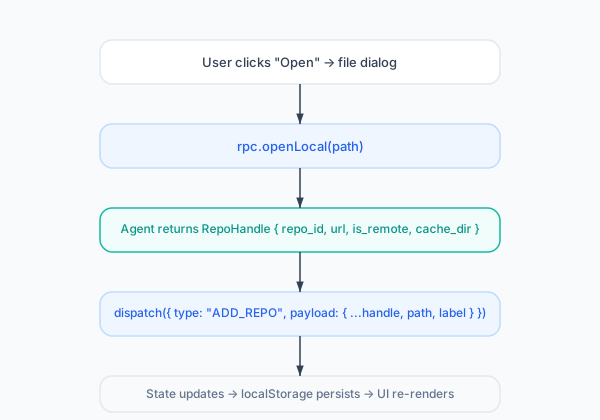
Opening a Repository
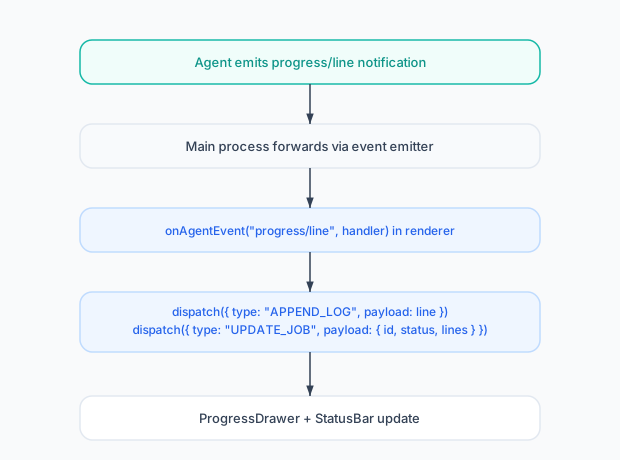
Progress Notifications
View-Local State
Most view-specific state lives in component-local useState hooks
rather than the global store. This keeps the global state minimal and
avoids unnecessary re-renders across unrelated views.
Examples:
- File tree expansion state →
ExplorerViewlocal state - Selected branch →
BranchesViewlocal state - Terminal sessions →
TerminalViewlocal state + registry - Diff hunks →
ChangesViewlocal state
Settings
User preferences are managed by a separate SettingsProvider:
interface Settings {
  theme: "dark" | "light" | "system";
  editorFontSize: number;
  maxLogLines: number;
  reopenReposOnStartup: boolean;
  diffStyle: "unified" | "split";
  commitTemplate: string;
  // ... 30+ settings
}
Settings persist to localStorage and are accessed via the
useSetting(key) hook. The subset that affects the main process
(agent log level, devtools) is mirrored to main-settings.json.
Memory Management
- Log ring buffer: Capped at
maxLogLines(default 5000) to prevent unbounded growth during long operations - Heap watcher: Monitors
performance.memoryand evicts cached data when heap usage exceeds thresholds - Deferred repos: Repos restored from localStorage are marked
deferred: true— no RPC calls until the user selects them