Language Server Protocol Integration
Crab Desktop integrates Language Server Protocol (LSP) support to provide code intelligence features: completions, hover documentation, go-to-definition, diagnostics, rename, and more. This enables a lightweight IDE experience within the desktop client.
Architecture
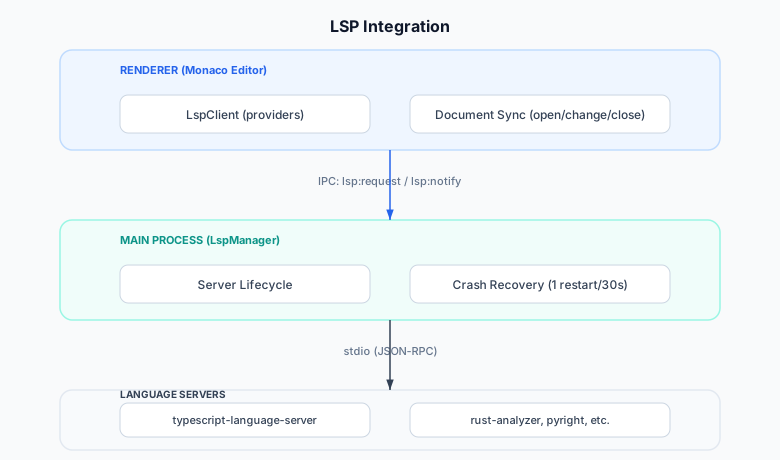
Server Discovery
The LSP manager discovers available language servers through:
- Bundled servers —
typescript-language-serverships with the app - PATH scanning — looks for known server binaries in the user's PATH
- Configuration — user-specified servers in settings
Discovered Server Interface
interface DiscoveredServer {
  language: string;       // e.g., "typescript", "rust", "python"
  command: string;        // e.g., "typescript-language-server"
  args: string[];         // e.g., ["--stdio"]
  available: boolean;     // Whether the binary was found
}
Server Lifecycle
Lazy Start
Servers are started on demand — when the user first opens a file of that language. This avoids spawning unused servers and keeps startup fast.
Initialization
Client                          Server
  │                               │
  │  initialize(rootUri, caps)    │
  │ ─────────────────────────────►│
  │                               │
  │  initialized()                │
  │ ◄─────────────────────────────│
  │                               │
  │  textDocument/didOpen         │
  │ ─────────────────────────────►│
Crash Recovery
If a server crashes:
- The manager records the crash timestamp
- If fewer than 1 crash in the last 30 seconds, auto-restart
- If the crash budget is exhausted, mark as "error" and notify user
- The user can manually restart from the Health view
Shutdown
On app quit, all servers receive shutdown + exit messages for
graceful cleanup.
Capabilities
The client conditionally registers Monaco providers based on the server's declared capabilities:
| Capability | Monaco Provider | Feature |
|---|---|---|
completionProvider | CompletionItemProvider | Autocomplete |
hoverProvider | HoverProvider | Hover documentation |
definitionProvider | DefinitionProvider | Go to definition |
referencesProvider | ReferenceProvider | Find all references |
documentHighlightProvider | DocumentHighlightProvider | Highlight occurrences |
renameProvider | RenameProvider | Symbol rename |
signatureHelpProvider | SignatureHelpProvider | Parameter hints |
codeActionProvider | CodeActionProvider | Quick fixes |
codeLensProvider | CodeLensProvider | Inline actions |
documentFormattingProvider | DocumentFormattingEditProvider | Format document |
inlayHintProvider | InlayHintsProvider | Inline type hints |
callHierarchyProvider | CallHierarchyProvider | Call hierarchy |
selectionRangeProvider | SelectionRangeProvider | Smart selection |
colorProvider | DocumentColorProvider | Color picker |
Document Synchronization
The client maintains document state synchronized with the server:
Open
When a file is opened in the editor:
{
  "method": "textDocument/didOpen",
  "params": {
    "textDocument": {
      "uri": "file:///path/to/file.ts",
      "languageId": "typescript",
      "version": 1,
      "text": "..."
    }
  }
}
Change
On each edit, an incremental change notification is sent:
{
  "method": "textDocument/didChange",
  "params": {
    "textDocument": { "uri": "...", "version": 2 },
    "contentChanges": [{ "range": {...}, "text": "new text" }]
  }
}
Close
When the editor tab is closed:
{
  "method": "textDocument/didClose",
  "params": { "textDocument": { "uri": "..." } }
}
Diagnostics
The server pushes diagnostics (errors, warnings) to the client:
{
  "method": "textDocument/publishDiagnostics",
  "params": {
    "uri": "file:///path/to/file.ts",
    "diagnostics": [
      {
        "range": { "start": { "line": 5, "character": 0 }, "end": { "line": 5, "character": 10 } },
        "severity": 1,
        "message": "Type 'string' is not assignable to type 'number'",
        "source": "typescript"
      }
    ]
  }
}
Diagnostics are rendered as:
- Squiggly underlines in the editor (red for errors, yellow for warnings)
- Entries in the Problems Panel
- Count badges in the status bar
Performance Considerations
- Debounced changes — edits are batched before sending to the server
- Cancellation — in-flight requests are cancelled when the user types again (e.g., completion requests)
- Lazy registration — providers are only registered for capabilities the server actually supports
- Memory — servers are stopped when no documents of that language are open (configurable idle timeout)
User-Facing Features
Health Card
The Settings → Health section shows LSP server status:
- Server name and language
- Running/stopped/error state
- Restart button
- Memory usage (if reported by server)
Status Bar
The status bar shows the active language server with a health indicator:
- 🟢 Running
- 🟡 Starting
- 🔴 Error
- Click to open Health view