Event System and File Watching
Crab Desktop uses a multi-layered event system to keep the UI synchronized with filesystem changes, git state transitions, and background operations. This document describes how events flow through the application and how each layer participates in change detection.
Overview
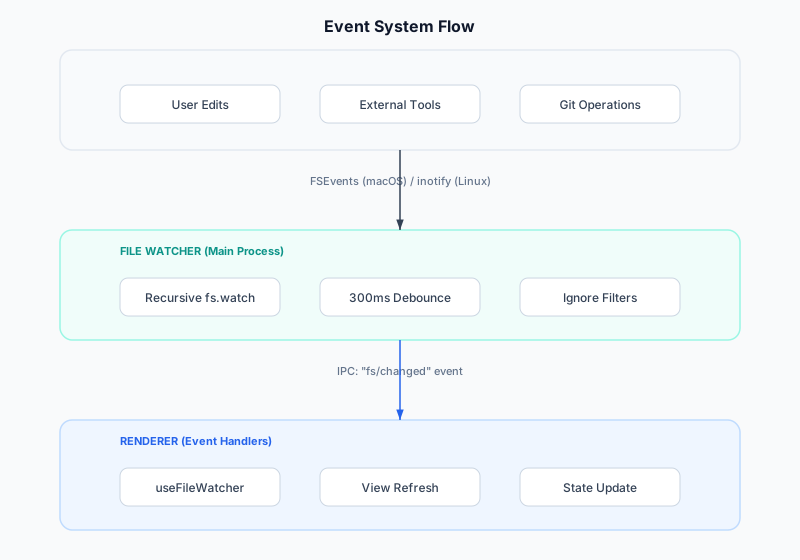
File Watcher Architecture
The file watcher runs in the Electron main process using Node's
built-in fs.watch with recursive: true. On macOS this is backed
by FSEvents, providing efficient kernel-level change notifications
without polling.
Ignored Paths
The watcher skips directories that produce high-frequency noise without affecting git status:
| Directory | Reason |
|---|---|
node_modules/ | Package installs produce thousands of events |
.git/objects/ | Object writes are internal to git |
.git/logs/ | Reflog writes don't affect working tree |
.crab/staging/ | Staging area managed by the agent |
.crab/cache/ | Cache writes are internal |
target/ | Rust build artifacts |
__pycache__/ | Python bytecode cache |
.venv/ | Python virtual environments |
Interesting Git Files
Certain files inside .git/ signal meaningful state changes that
views need to react to:
| File | Signals |
|---|---|
index | Staging area changed (external git add) |
HEAD | Branch switch or commit |
MERGE_HEAD | Merge in progress |
REBASE_HEAD | Rebase in progress |
CHERRY_PICK_HEAD | Cherry-pick in progress |
refs/heads/* | Branch created/deleted/updated |
refs/tags/* | Tag created/deleted |
Debouncing Strategy
Filesystem events arrive in bursts (a git checkout can trigger
hundreds of file change events). The watcher coalesces these into a
single notification using a 300ms debounce window:
Events:  ─●─●●●──●─────────────────●●─────────
Timer:   ─[====]──[====]────────────[====]──────
Notify:  ─────────X─────────────────────────X───
Only one "fs/changed" IPC message is sent per debounce window, regardless of how many individual file events occurred.
Renderer-Side Event Handling
useFileWatcher Hook
Views subscribe to filesystem changes via the useFileWatcher hook:
function useFileWatcher(repoPath: string | undefined, callback: () => void) {
  useEffect(() => {
    if (!repoPath) return;
    const handler = (_event: unknown, payload: { path: string }) => {
      // Only refresh if the change is in our repo
      if (payload.path.startsWith(repoPath)) callback();
    };
    window.crab.on("fs/changed", handler);
    return () => window.crab.off("fs/changed", handler);
  }, [repoPath, callback]);
}
View Refresh Patterns
Each view handles filesystem events differently:
| View | Refresh Action |
|---|---|
| Explorer | Re-fetch directory listing |
| Changes | Re-run git status --porcelain |
| Branches | Re-fetch refs list |
| Timeline | Re-fetch recent commits |
| Worktrees | Re-fetch worktree status |
| Dashboard | Re-fetch summary metrics |
Agent Notifications
The Rust agent also emits events for operations it initiates:
Progress Notifications
{ "jsonrpc": "2.0", "method": "progress/line", "params": { "op": "hydrate", "line": "..." } }
{ "jsonrpc": "2.0", "method": "progress/partial", "params": { "entries": [...] } }
{ "jsonrpc": "2.0", "method": "progress/complete", "params": { "op": "push", "ok": true } }
Watcher Notifications
The agent's internal filesystem watcher (using the notify crate)
emits change events for the background indexer:
{ "jsonrpc": "2.0", "method": "watcher/changed", "params": { "paths": ["src/main.rs"] } }Custom Events (Renderer)
The renderer uses DOM custom events for cross-component communication that doesn't warrant global state:
| Event | Purpose |
|---|---|
crab:active-view-changed | Notify when the active view changes |
crab:open-command-palette | Programmatically open the palette |
crab:repo-opened | A repo was opened via command |
crab:toast | Display a toast notification |
Error Handling
Event handlers are wrapped in try-catch to prevent a single failed
refresh from breaking the event pipeline. Errors are logged via
tracing (agent) or console.warn (renderer) but never propagated
to crash the application.