Tracking Files
Tracking tells Crab which files to manage. When you track a pattern like *.safetensors, Crab registers it in .gitattributes so that git routes matching files through Crab's filter driver. From that point on, those files are chunked, deduplicated, and stored in cloud storage instead of bloating your git history.
How Tracking Works
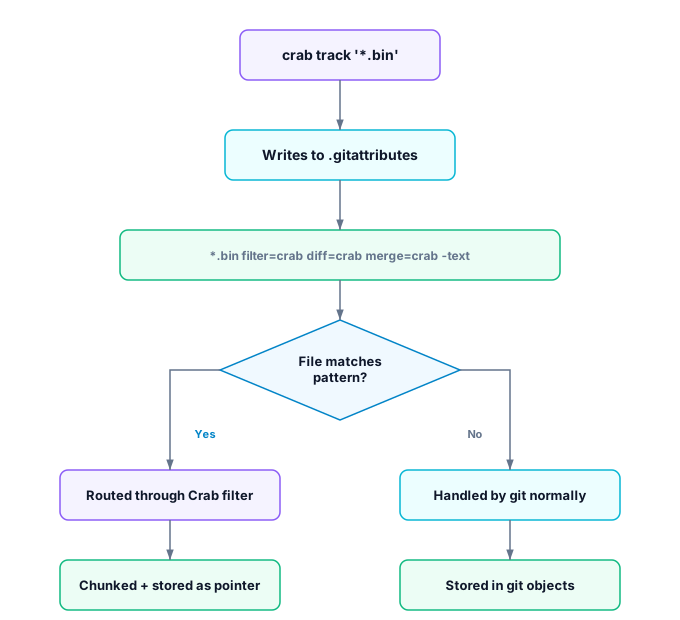
The .gitattributes entry tells git three things:
- filter=crab — Route through Crab's clean/smudge filter on commit/checkout
- diff=crab — Use Crab's chunk-level diff driver
- -text — Treat as binary (no line-ending conversion)
Setting Up Tracking
Automatic tracking (recommended)
In most cases, you don't need to manually configure tracking. crab setup and
crab add automatically detect large files and track their extensions:
crab init crab://my-bucket/my-project
crab setup
# Detected large files — tracking: *.safetensors, *.bin
If you add new file types later, crab add will detect untracked extensions and auto-track them.
Manual tracking
For fine-grained control, track patterns explicitly:
crab track '*.safetensors'
crab track '*.bin'
crab track '*.onnx'
crab track '*.parquet'
Track directories
crab track 'data/models/**'
crab track 'assets/textures/**'
View current tracking patterns
crab trackOutput:
*.safetensors (filter=crab diff=crab merge=crab -text)
*.bin (filter=crab diff=crab merge=crab -text)
data/models/** (filter=crab diff=crab merge=crab -text)
Stop tracking a pattern
crab untrack '*.onnx'This removes the pattern from .gitattributes. Files already stored as pointers remain as pointers until you hydrate and re-add them outside Crab tracking.
What Should You Track?
Track files that are:
- Large (> 1 MB) — Where git's storage becomes inefficient
- Binary — Where git can't diff or merge meaningfully
- Frequently updated — Where deduplication saves the most space
Common patterns by domain
| Domain | Patterns |
|---|---|
| Machine Learning | *.safetensors, *.bin, *.onnx, *.pkl, *.h5 |
| Game Development | *.fbx, *.blend, *.psd, *.png, *.wav |
| Data Engineering | *.parquet, *.arrow, *.csv (large), *.db |
| Media Production | *.mov, *.mp4, *.exr, *.dpx |
| Scientific Computing | *.hdf5, *.nc, *.fits, *.npy |
Sharing Tracking Rules
.gitattributes is a regular git file — commit it to share tracking rules with your team:
crab track '*.bin'
crab track '*.safetensors'
git add .gitattributes
git commit -m "Track model files with Crab"
When collaborators clone or pull, they automatically get the same tracking configuration. No per-user setup needed.
Tracking vs. Adding
Tracking and adding are conceptually separate, but Crab handles the common case automatically:
- Auto-track flow (most users): Run
crab setupaftercrab init, or runcrab add .when no patterns exist. Crab detects large files and tracks them automatically. - Manual flow (fine-grained control): Register patterns first with
crab track, thencrab add.
# Automatic (recommended for most users):
crab add '*.bin'
# → Auto-tracks *.bin if not already in .gitattributes, then stages

# Manual (when you need precise control):
crab track '*.bin'
crab add '*.bin'
git commit -m "Update model"
git push

# One-shot (simplest possible):
crab ship '*.bin' -m "Update model"
Pattern Syntax
Crab uses the same glob syntax as .gitattributes:
| Pattern | Matches |
|---|---|
*.bin | Any .bin file in any directory |
models/** | Everything under models/ recursively |
data/*.parquet | .parquet files directly in data/ (not subdirectories) |
**/*.safetensors | .safetensors files at any depth |
Next Steps
- Adding Files — Stage tracked files for push
- Working with Files — The complete add → commit → push cycle
- Working with Files — Understand hydration, dehydration, and the file lifecycle