Installation & Setup
Crab is a single binary that acts as both a git remote helper and a large-file filter driver. Once installed, it integrates transparently with git — no plugins, no extensions, no separate daemon to manage.
Install Crab
macOS or Linux with Homebrew
brew install crabbuild/tap/crabHomebrew installs crab, the git-remote-crab helper that Git uses for
crab:// remotes, crab-nfs-mount for the default NFS mount backend, and
crab-fuse-mount for explicit FUSE mounts on macOS and Linux. macFUSE is not
required to install or use normal Crab commands; it is only needed when you run
crab mount --backend=fuse on macOS.
macOS or Linux one-line installer
curl -fsSL https://crab.build/install.sh | bashThis downloads the latest release binary for your platform, verifies the
matching SHA256SUMS.txt entry, installs to ~/.crab/bin, and creates the
git-remote-crab symlink. Unix archives also install crab-nfs-mount and
crab-fuse-mount; macFUSE is optional until you run
crab mount --backend=fuse on macOS.
Windows PowerShell
irm https://crab.build/install.ps1 | iexThe Windows installer verifies the release checksum, installs to ~\.crab\bin,
adds that directory to your user PATH, and writes crab.exe,
crab-nfs-mount.exe, and git-remote-crab.exe.
Verify installation
crab version
command -v git-remote-crab
You should see output similar to:
crab 1.0.15 (build metadata varies by release)How Crab Integrates with Git
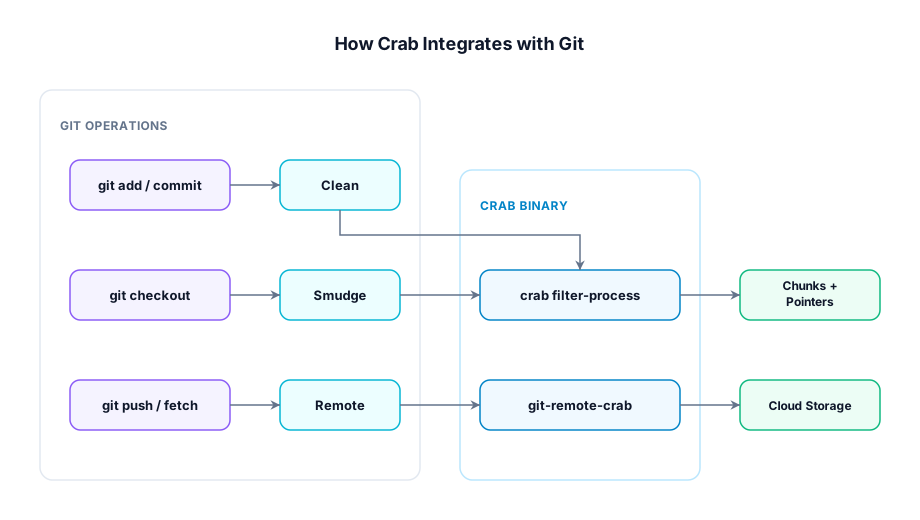
Crab works through two git extension points:
-
Filter driver — Routes tracked files through Crab's clean/smudge pipeline during checkout and commit. The clean filter replaces file content with pointer blobs; the smudge filter can reconstruct content or pass pointers through (lazy mode).
-
Remote helper — Handles
crab://URLs during push and fetch. Uploads xorbs to cloud storage on push, downloads them on fetch.
Both are registered automatically when you run crab init or crab clone. You rarely need to install them manually.
What Gets Configured
When Crab initializes a repository, it sets up:
| Component | Location | Purpose |
|---|---|---|
| Filter driver | .git/config | Routes tracked files through Crab |
| Remote URL | crab.toml | Points to your cloud bucket |
| Config | .crab/local.toml | Local Crab settings |
| Staging area | .crab/staging/ | Unpublished chunks awaiting push; not a disposable cache |
The filter driver entry in .git/config looks like:
[filter "crab"]
    process = crab filter-process
    required = true
Installation Scopes
You can install the filter driver at different scopes:
| Scope | Applies to | Use when |
|---|---|---|
| Local (default) | Current repository only | Most common — per-repo setup |
| Global | All repos for your user | You use Crab in every project |
| System | All users on the machine | Shared CI runners |
Global install (recommended for teams)
If you work with multiple Crab repositories, install the filter driver globally once:
crab install --globalAfter this, any repository with .gitattributes containing filter=crab rules will work automatically — even repos cloned with plain git clone (no crab clone needed). This is the simplest setup for collaborators joining an existing project:
# One-time setup:
crab install --global

# Then clone normally:
git clone git@github.com:team/ml-models.git
# The filter driver is already registered globally
For most individual users, the local scope (set automatically by crab init) is sufficient.
CI / Server Setup
For CI environments where you want fast checkouts without hydrating files:
crab install --skip-smudgeThis configures the smudge filter to pass pointers through unchanged. Git can check out the small pointer blobs, and files remain as pointers until you explicitly hydrate them:
crab hydrate --manifest .crab/manifests/ci.txtVerifying Your Setup
Run the health check to confirm everything is configured correctly:
crab doctorThis checks:
- Binary is on PATH and accessible
- Filter driver is registered in git config
- Cloud credentials are valid
- Remote bucket is accessible
- Staging area is healthy
Next Steps
- Create a new repository — Set up Crab with your cloud bucket
- Clone an existing repository — Get started with a team's repo
- Track file patterns — Tell Crab which files to manage
CLI Reference
For complete crab install / crab uninstall command syntax and options, run
crab install --help or crab uninstall --help.