Importing Existing Buckets
If you already have files in cloud storage — datasets, models, media assets — you don't need to download them locally and re-upload through Crab. The import command reads objects directly from your bucket and creates a Crab-managed git repository in place.
What Import Does
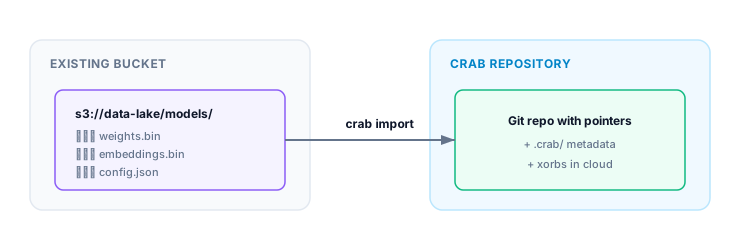
Import reads your existing files, chunks them, builds the Crab metadata (xorbs, shards, file indices), and creates a git repository with pointer blobs. The source files stay untouched — they're read, not moved.
After import, you have a fully functional Crab repository that you can clone, hydrate, push to, and collaborate on.
Same-Bucket Import
The most common case: your files are already in S3 and you want to add Crab management without moving data:
crab import \
  --from s3://my-bucket/datasets/v2/ \
  --to   s3://my-bucket/repos/v2
When source and target are in the same bucket, Crab avoids re-uploading bytes — it creates the metadata layout alongside your existing objects.
For direct imports, Crab can build the target crab:// URL from a bucket and repository name:
crab import s3://my-bucket/datasets/v2/ \
  --bucket my-bucket \
  --name repos/v2
Local directories work too; plain paths are normalized to file:// internally:
crab import ./large-files \
  --bucket crab \
  --name import-demo
Use --dest-prefix when imported files should live under a specific directory inside the new Git repository:
crab import s3://crab/crab/large-files \
  --bucket crab \
  --name import-demo \
  --dest-prefix crab/large-files
Cross-Bucket Import
Move data management from one bucket to another:
crab import \
  --from s3://data-lake-prod/models/ \
  --to   s3://crab-repos/models-v1
Versioned Bucket History
If your source bucket has S3 versioning enabled, Crab can reconstruct git history from object versions:
Each time window (default: 1 hour) becomes one git commit. Delete markers surface as git deletions.
# Auto-detect versioning, one commit per hour
crab import \
  --from s3://versioned-bucket/prod/ \
  --to   s3://versioned-bucket/repos/prod

# Coarser commits — one per day
crab import \
  --from s3://versioned-bucket/prod/ \
  --to   s3://versioned-bucket/repos/prod \
  --window 24h
Filtering What Gets Imported
You don't have to import everything:
# Only model files
crab import \
  --from s3://my-bucket/data/ \
  --to   s3://my-bucket/repos/models \
  --include '*.safetensors' --include '*.bin'

# Everything except logs
crab import \
  --from s3://my-bucket/data/ \
  --to   s3://my-bucket/repos/data \
  --exclude 'logs/**'
Preview Before Importing
See what would be imported without actually doing it:
crab import \
  --from s3://my-bucket/datasets/ \
  --to   s3://my-bucket/repos/datasets \
  --dry-run
Shows file count, total bytes, extension breakdown, and planned commit count.
Resumable Imports
Large imports (millions of files, terabytes of data) can take hours. If interrupted, resume from where you left off:
# First run (interrupted)
crab import --from s3://bucket/data/ --to s3://bucket/repos/data --into ./data

# Resume after interruption
crab import --into ./data --resume
The import journal (.crab/import-journal.db) tracks progress per-object. Only pending and failed objects are retried on resume.
After Import
Once import completes, you have a standard Crab repository:
cd imported-repo
crab status              # see tracked files
crab hydrate --all       # materialize content
git remote -v            # origin points to your target URL
Collaborators can clone it:
crab clone crab://my-bucket/repos/dataSupported Sources
| Provider | URL Format |
|---|---|
| AWS S3 | s3://bucket/prefix/ |
| Google Cloud Storage | gs://bucket/prefix/ |
| Azure Blob Storage | az://container/prefix/ |
| Local filesystem | ./path/to/dir/ or file:///path/to/dir/ |
CLI Reference
For complete command syntax, all options (versioning, time ranges, author templates, error codes), and JSON output format, see the crab import reference.