Mirror Mode (GitHub + Crab)
Mirror mode keeps GitHub (or GitLab) as the collaboration control plane for pull requests, reviews, branch protection, CI, issues, and webhooks. Crab is a second Git remote backed by object storage and stores both the pushed Git graph and large-file data.
Data Flow
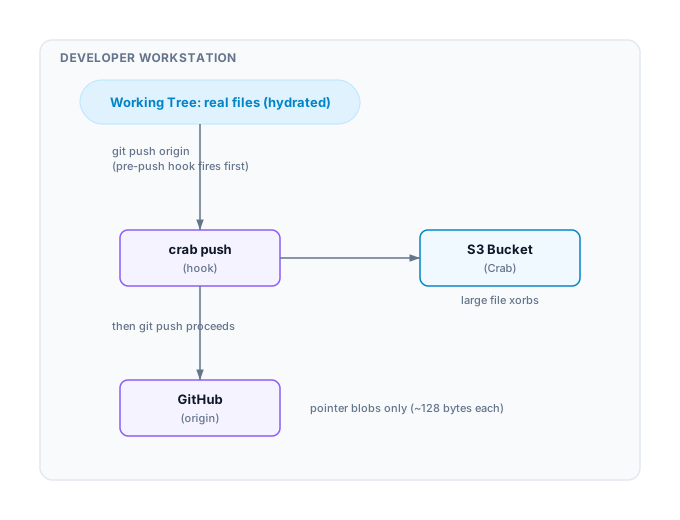
When collaborators pull from GitHub, the post-checkout hook hydrates pointer files from the Crab remote automatically.
Setup: Repository Owner
Prerequisites
- A GitHub/GitLab repo with an
originremote already configured - An S3/GCS/Azure bucket for Crab storage
- Cloud credentials configured (AWS CLI, gcloud, or az)
Initialize
cd my-project
crab init --mirror=origin crab://my-bucket/my-repo
This command:
- Validates that the
originremote exists - Adds a
crabremote pointing to your bucket - Installs
pre-push,post-checkout, andpost-mergehooks - Generates
crab.tomlwith a[mirror]section - Run
crab setupto auto-track large file patterns in.gitattributes
Push the configuration
crab setup
crab ship . -m "enable crab for large files"
Now crab.toml is on GitHub. Collaborators will inherit the mirror setup.
Setup: Collaborator
After cloning from GitHub:
git clone git@github.com:team/project.git
cd project
crab init
Running crab init with no URL detects the [mirror] section in crab.toml and automatically:
- Adds the
crabremote - Installs mirror hooks
- Hydrates files per
[hydrate]settings
If the collaborator previously ran crab install --global, the global filter
driver can activate from crab.toml, but still run crab init when the repo
needs the mirror remote and hooks installed locally.
How Hooks Work
pre-push — Before pushing to GitHub
#!/bin/sh
# Crab mirror: push published pointer recipes before refs go to origin
crab push --remote crab --quiet 2>/dev/null
Ensures large-file content reaches your bucket before pointer blobs reach GitHub. If the Crab push fails, the git push is aborted — preventing dangling pointers.
The two remote updates are not one distributed transaction. Crab can be ahead if its push succeeds and GitHub later rejects the push. Server-side merges, bots, and clients without the hook can also advance GitHub without advancing Crab. Retry to converge and monitor ref divergence.
post-checkout — After switching branches or cloning
#!/bin/sh
# Crab mirror: hydrate pointer files after checkout
crab hydrate . 2>/dev/null || true
Materializes pointer files so you see real content after branch switches. Non-fatal on failure.
post-merge — After pulling or merging
#!/bin/sh
# Crab mirror: hydrate after merge/pull
crab hydrate . 2>/dev/null || true
Same behavior as post-checkout, triggered by git pull and git merge.
Existing hooks preserved
Crab appends its lines to existing hooks — it never overwrites your custom hooks. Installation is idempotent.
Checking Status
crab statusWith mirror mode active, you'll see:
Mirror: origin ↔ crab (crab://my-bucket/my-repo) | healthy
  Crab remote: reachable
  Pending push: 0 files
Configuration
The [mirror] section in crab.toml:
[mirror]
origin_remote = "origin"    # GitHub/GitLab remote name
crab_remote = "crab"        # Crab storage remote name
When to Use Mirror Mode
Use mirror mode when:
- Your team uses GitHub/GitLab for code review and CI
- You have large files (models, datasets, assets) that bloat git
- You want PRs to show pointer diffs, not binary blobs
- You need deduplication and lazy checkout for large files
Use standard mode when:
- Crab is your only remote (no GitHub/GitLab)
- You don't need code review on a separate platform
- You want the simplest possible setup
Production Team Posture
- Keep GitHub/GitLab canonical for collaboration and policy. Crab does not provide pull requests, branch protection, merge queues, CI, issues, or webhooks.
- Keep Crab/object storage canonical for large data, using workload identity and least-privilege bucket policy instead of shared static keys.
- Install hooks on every developer and automation clone, then enforce pointer availability in CI because client hooks are bypassable.
- Use
crab mirror SOURCE DESTINATIONonly as a scheduled one-way full-ref DR sync. It usesgit push --mirror, which deletes destination-only refs; never schedule it in both directions. - Before using Crab as the sole Git backbone, qualify multi-node storage failures and prove monitoring, backup restore, RPO, and RTO in your own environment.
Troubleshooting
Hooks not firing
Verify hooks are installed:
ls -la .git/hooks/pre-push
cat .git/hooks/pre-push | grep "Crab mirror"
Re-run crab init to reinstall if missing.
Hydration fails after pull
Check credentials and remote connectivity:
crab doctor
git remote get-url crab
Push rejected by GitHub (file too large)
This means the pre-push hook didn't fire. Check that:
- The hook file exists and is executable
crabis on your PATH- Run
crab initto reinstall hooks
Related
- Project Configuration —
crab.tomlreference crab init— the--mirrorflagcrab ship— one-command commit + push