Running Pipelines
crab run is the primary workflow executor. crab repro is the DVC-compatible
spelling for the same command.
Enable and Validate
# Fresh configs are enabled; set workflow.enabled false only to opt out.
crab run --validate
--validate parses workflow files and checks semantic errors without running
commands. Use it in pre-commit hooks and CI before expensive jobs.
Run the Full DAG
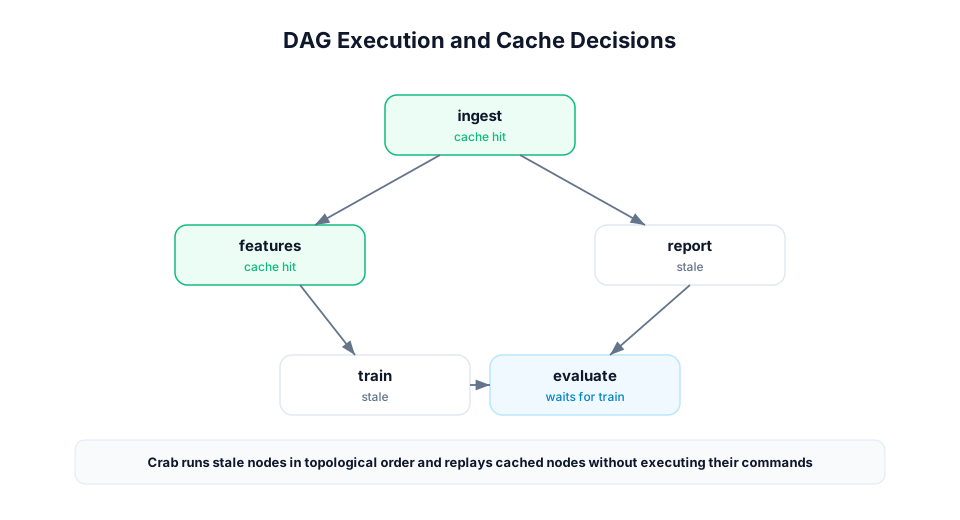
crab runCrab discovers workflow files, builds the DAG, checks each stage against
crab.lock and the stage cache, and runs stale stages in topological order.
Preview the plan:
crab run --dry
crab run --dry --explain-miss
Target Specific Stages
crab run train
crab repro train
By default, target runs include upstream dependencies needed by the selected stage. DVC-compatible target controls are available:
| Mode | Command | Behavior |
|---|---|---|
| Single item | crab repro --single-item train | Run only the named stage target. |
| Downstream | crab repro --downstream prepare | Run the target and downstream consumers. |
| Pipeline | crab repro --pipeline train | Run the pipeline component containing the target. |
| All pipelines | crab repro --all-pipelines | Discover and run every pipeline. |
| Glob | crab repro --glob "train*" | Match target names with glob patterns. |
Use --stages <glob> for Crab-native glob selection:
crab run --stages "train*"Cache Controls
| Option | Use when |
|---|---|
--force | You want selected stages to re-execute even on cache hits. |
--force-downstream | A stage re-ran and every descendant should re-run too. |
--no-run-cache | You want to execute commands but still write fresh cache entries. |
--cache-only | CI should restore outputs from cache and fail if anything is missing. |
--no-commit | You want to test execution without writing cache entries or output xorbs. |
--no-overwrite | Existing output files should not be replaced by cache replay. |
Use --explain-miss whenever a cache miss is surprising. It prints the input
hash breakdown used to compute the stage hash.
Remote Data Controls
crab run --pull --allow-missing--pull downloads missing dependency files for stages that need to execute.
--allow-missing lets stages remain skipped when missing workspace deps match
the lockfile. Together they make CI jobs hydrate only what changed.
Concurrency and Locks
crab run --parallelism 4
crab run --no-wait
crab run --lock-timeout 30
Crab holds a scheduler lock while running a workflow. Use --no-wait for CI
jobs that should fail fast if another run is active. Configure the default with:
crab config set workflow.parallelism 4
crab config set workflow.lock_timeout_secs 600
Failure Modes
By default, a failed stage stops dependent work. Use partial-success modes for large DAGs:
crab run --keep-going
crab run --ignore-errors
--keep-going skips downstream consumers of failed stages but continues
unrelated branches. --ignore-errors is more aggressive and attempts remaining
work even when producers failed.
Structured Output
Use --json for one final envelope:
crab run --jsonUse --jsonl for streaming automation:
crab run --jsonl | tee workflow-events.jsonlJSONL events are best for CI logs, dashboards, and long-running jobs because they report stage start, cache checks, produced outputs, failures, and commits as they happen.
Watch Mode
crab run --watchWatch mode executes once, then watches declared deps for changes and reruns affected stages. Use it for local development, not unattended production jobs.
Recursive Workflows
crab run --recursive
crab config set workflow.discover recursive
Recursive discovery merges nested crab.yaml files and *.workflow.yaml
files. For monorepos, pair it with split lockfiles so teams can own smaller
workflow surfaces.