Remote Cache and CI
Remote stage cache lets one machine produce outputs and another machine reuse them without re-running expensive commands.
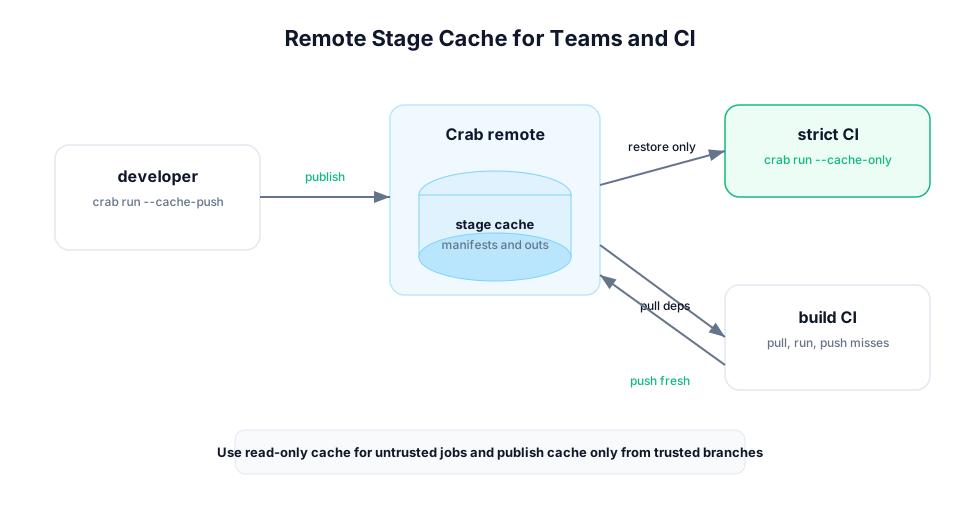
Cache Publishing Modes
Publish as each stage completes:
crab run --cache-pushBackfill all local cache entries:
crab workflow push-cache --allUse --cache-push for normal production runs. Use push-cache --all after
offline work or after enabling remote cache for an existing repo.
Cache Consumption Modes
Require every needed stage to exist in cache:
crab run --cache-onlyPull missing deps only for stages that must execute:
crab run --pull --allow-missingRun and publish fresh misses:
crab run --pull --allow-missing --cache-pushCI Pattern: Verify Lockfile and Cache
Use this job when CI should fail if the committed workflow state is not fully reproducible from remote cache:
crab init
crab config set workflow.enabled true
crab run --validate
crab run --cache-only --json
crab metrics show --json
This is fast and strict. It proves the lockfile and remote cache are complete.
CI Pattern: Build Missing Cache
Use this job on trusted branches:
crab init
crab config set workflow.enabled true
crab run --validate
crab run --pull --allow-missing --cache-push --jsonl
crab workflow push-cache --all --json
This lets CI hydrate only required inputs, run stale stages, and publish new cache entries for later jobs.
Read-Only Cache Policy
Some environments should read workflow cache but never publish it:
crab config set workflow.remote_cache_readonly trueUse this for untrusted pull requests or ephemeral review jobs. Trusted mainline jobs can leave it false and publish cache.
Recommended Branch Policy
| Branch type | Suggested behavior |
|---|---|
| Pull request from fork | --cache-only or read-only cache. Do not publish. |
| Pull request from trusted branch | --pull --allow-missing, publish only if policy allows. |
| Main branch | --pull --allow-missing --cache-push. |
| Nightly rebuild | --force --cache-push when you intentionally refresh outputs. |
Artifacts to Upload
Upload these as CI artifacts when available:
workflow-events.jsonlfromcrab run --jsonl.params.diff.jsonfromcrab params diff --json.metrics.diff.jsonfromcrab metrics diff --json.- HTML plot output from
crab plots diff --format html.
Never upload cloud credentials, .crab/local.toml files with secrets, or raw
object-store credentials.
Failure Handling
- Exit code 3 from
--cache-onlymeans a cache entry was missing. - Scheduler lock errors usually mean another workflow run is active.
- Missing deps mean the workspace is incomplete or
--pullwas not used. - Cache misses with unchanged inputs should be investigated with
crab run --dry --explain-miss.