Workflow Concepts
Workflow is built around one rule: a stage result can be reused when the stage inputs are identical. Crab turns each stage into a content-addressed function.
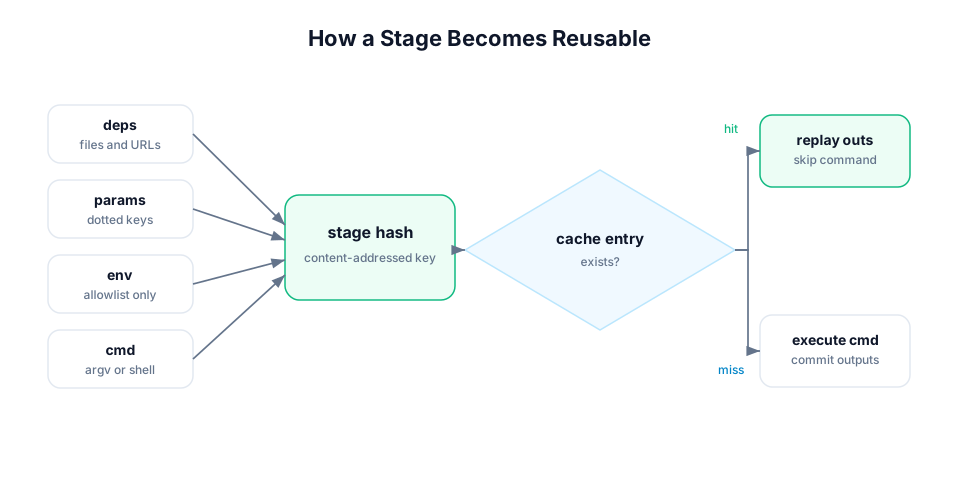
Stage
A stage is a named command with declared inputs and outputs:
stages:
  train:
    cmd: python src/train.py
    deps:
      - src/train.py
      - data/features.parquet
    params:
      - train.lr
      - train.epochs
    outs:
      - models/model.pkl
    metrics:
      - metrics/train.json
Think of a stage as:
(cmd, deps, params, selected env, workflow metadata) -> outs, metrics, plotsIf the left side is unchanged and a matching cache entry exists, Crab restores the outputs instead of running the command.
Dependencies
deps are files, directories, URLs, remote references, or upstream stage
outputs that must exist before a stage runs. Crab hashes dependency content and
uses those hashes in the stage hash.
Declare every file that can change the result. Missing deps fail early unless a
lockfile proves the dep is unchanged and the run uses --allow-missing.
Outputs
outs are files or directories the stage produces. On a fresh run, Crab records
their hashes and stores them in the stage cache. On a cache hit, Crab restores
them into the workspace.
Use --no-overwrite when you want cache replay to fail instead of replacing a
different existing file.
Parameters
params are scalar values loaded from params files such as params.yaml. They
let you change model settings, feature choices, or thresholds without changing
stage command strings.
params:
  - params.yaml

stages:
  train:
    params:
      - train.lr
      - train.epochs
Inspect and compare them with crab params show and crab params diff.
Metrics and Plots
Metrics are structured output files, usually JSON, YAML, CSV, or TSV. Plots are metric-like files that can render as Vega-Lite or HTML.
metrics:
  - metrics/train.json

plots:
  - metrics/loss.csv:
      x: epoch
      y: val_loss
Use crab metrics show, crab metrics diff, crab plots show, and
crab plots diff to inspect results.
Lockfile
crab.lock records the last successful materialized state of the workflow:
stage hashes, dependency hashes, output hashes, metrics, and plots.
Commit the lockfile with the workflow definition. It lets reviewers and CI see what changed, and it lets Crab decide which stages are stale.
Large monorepos can use split lockfiles. See Split Workflows and Lockfiles.
Stage Cache
The stage cache stores successful stage manifests and output references. Local
cache entries live under .crab/cache/stages/. Remote cache entries are pushed
to the configured Crab remote with crab run --cache-push or
crab workflow push-cache --all.
The cache is stage-complete: a cache hit restores the declared outputs for the whole stage. If only one output should be regenerated independently, split the stage.
Journal
Each run writes a journal under .crab/workflow/runs/. The journal records
stage start, cache checks, produced outputs, commits, failures, and aborts.
Journals make interrupted runs recoverable. Use crab workflow journal to
inspect history and crab run --abandon <run-id> when a stuck run should be
marked abandoned.
Experiments
Experiments run the DAG in a temporary worktree with parameter overrides. The workspace stays clean while Crab records metadata, metrics, stage hashes, and the base commit.
Use experiments for model sweeps, report variants, and any run where you want to compare results before applying them to the current workspace.