Verifying Repository Integrity
crab fsck cross-checks Crab manifests, pack/index presence, the shard/xorb
data chain, and coordination state against the object store. It is not yet a
full reconstruction and Git-connectivity check of current head.
Think of it as git fsck extended to cover Crab's object store layer.
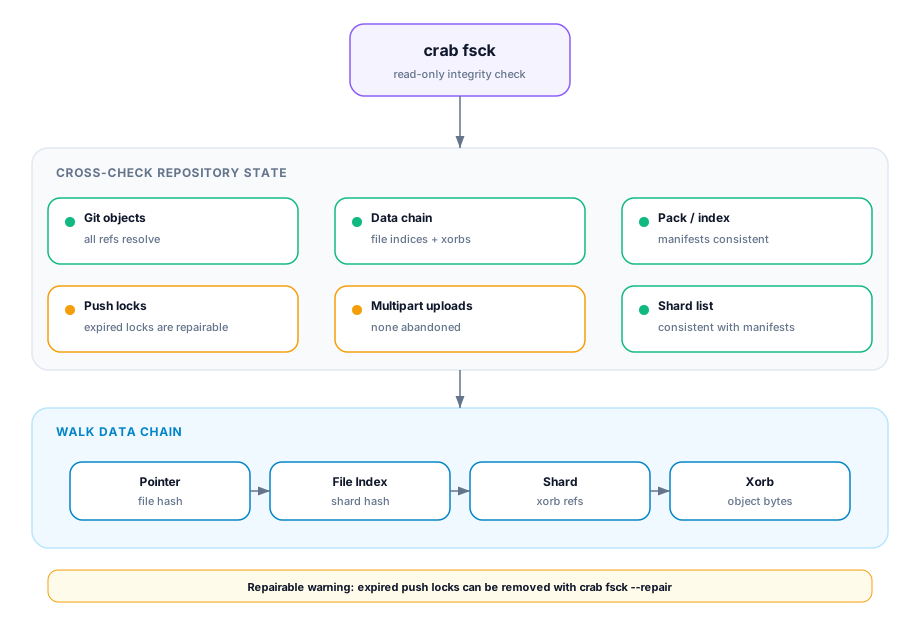
Running an Integrity Check
crab fsck ✓ Git objects all refs resolve
✓ Data chain all file indices and xorbs present
✓ Pack list consistent
⚠ Push locks 1 expired lock (3 days old)
✓ Multipart uploads none abandoned
✓ Shard list consistent
1 issue found:
⚠ Expired push lock: refs/push-locks/abc123 (age: 3d 2h)
Repairable: yes (run with --repair)Issue Categories
Critical (data integrity)
| Issue | Description | Auto-repairable |
|---|---|---|
| Missing file index | Pointer references a missing file index | ✗ |
| Missing xorb | File index references a non-existent xorb | ✗ |
| Pack list divergence | Manifest-selected pack or index is absent | ✗ |
Warnings (operational)
| Issue | Description | Auto-repairable |
|---|---|---|
| Expired push lock | Lock from a crashed process | ✓ |
| Orphan shard | Shard not referenced by any file index | ✗ |
| Shard list divergence | Shard list doesn't match actual shards | ✗ |
Automatic Repair
crab fsck --repairRepair is conservative:
- Expired locks are deleted
- Derivable historical Git visibility proofs can be rebuilt
Repair is limited to issues explicitly marked repairable. Missing content requires history, replica, cache, or backup recovery. Provider-side incomplete multipart uploads require a provider lifecycle rule because the generic object-store API cannot enumerate them.
Verify after repair
Run the read-only check again and test reconstruction from an isolated cache:
crab fsck --json > fsck-after.json
crab hydrate path/to/representative-file.bin
The second fsck result must no longer contain the repairable issue. Hydration
adds a byte-level reconstruction check for one important path; it does not turn
fsck into a complete hydration of the repository. For a release gate, select
representative files across the storage classes and data paths used by that
release.
When to Run
| Scenario | Why |
|---|---|
| After a push failure or crash | Check for leftover locks |
Before running crab gc | Ensure reference graph is consistent |
| Periodic maintenance (CI) | Catch drift early |
When crab doctor reports remote issues | Deep investigation |
Prerequisites
- Repository must be initialized (
crab initorcrab clone) - Valid cloud credentials for the remote bucket
--repairrequires write permissions
CLI Reference
For complete command syntax and all available flags, see the crab fsck reference.