Recovering Files from Cold Storage
When files are stored in archive storage classes (S3 Glacier, Deep Archive, Azure Archive), they can't be read immediately. Crab's hydrate-restore subsystem detects archived xorbs during hydration and either automatically initiates a restore or fails with a clear error explaining what needs to happen.
How It Works
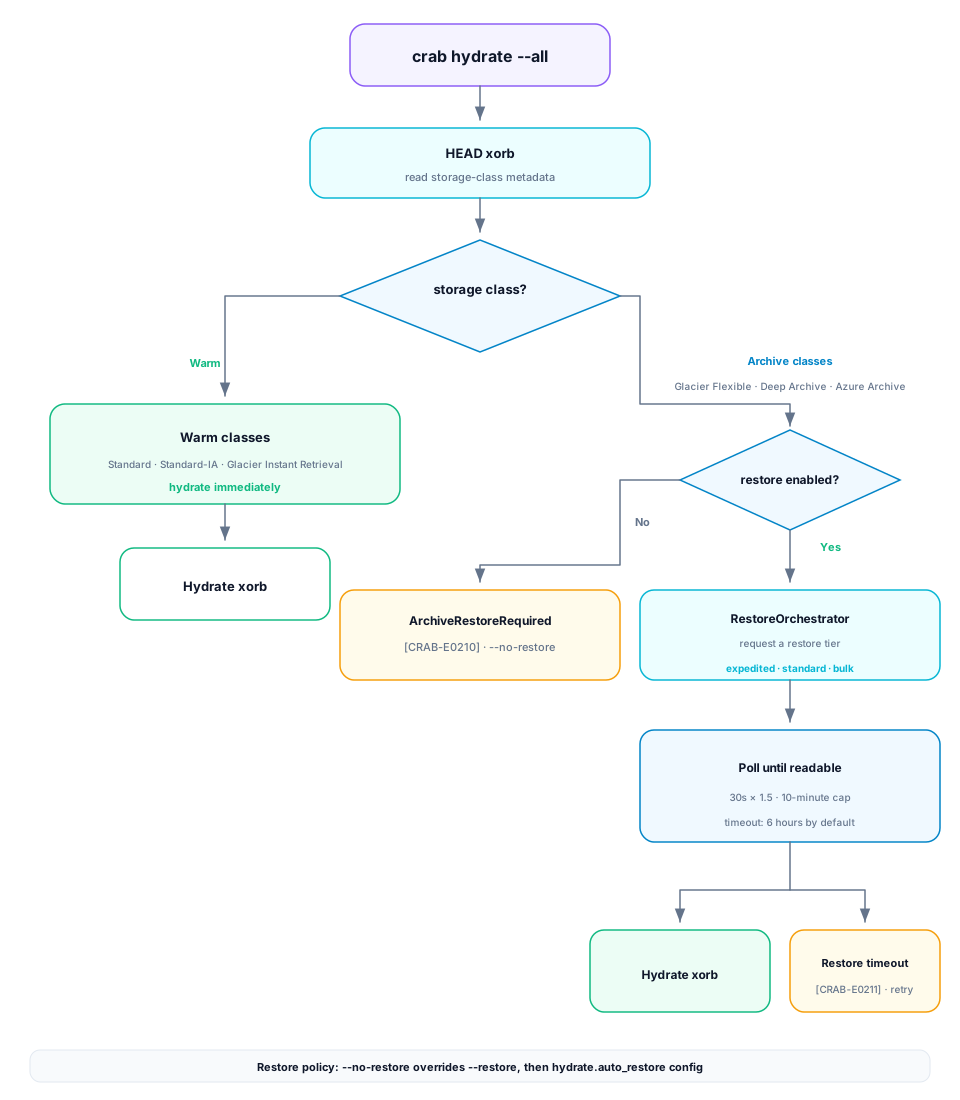
During hydration, each xorb is probed with a HEAD request that includes storage-class metadata:
- Warm classes (Standard, Standard-IA, Glacier Instant Retrieval) — hydration proceeds immediately.
- Archive classes (Glacier Flexible, Deep Archive, Azure Archive) — the RestoreOrchestrator issues a restore request and polls until the object becomes readable.
Polling Behavior
Restore polling uses exponential back-off: 30-second initial interval, 1.5× multiplier, 10-minute cap, with full jitter. If the restore doesn't complete within tier.restore_timeout_secs (default 6 hours), Crab emits ArchiveRestoreTimeout [CRAB-E0211]. The provider-side restore continues — retry later.
Batch restores are capped at tier.restore_max_concurrency (default 16) concurrent requests.
Controlling Restore Behavior
Enable automatic restore (default)
crab hydrate --allUses the configured restore tier. Blocks until all restores complete.
Use expedited restore for urgent access
crab hydrate --all --restore-tier=expeditedFastest (1–5 minutes on S3 Glacier Flexible), most expensive.
Use bulk restore for cost-sensitive batch jobs
crab hydrate --all --restore-tier=bulk --restore-duration-days=14Cheapest tier, suitable for overnight jobs where latency is acceptable.
Disable restore (fail on archived objects)
crab hydrate --all --no-restoreFails immediately with ArchiveRestoreRequired [CRAB-E0210] if any required xorb is archived.
Priority Resolution
The effective auto-restore setting is resolved in priority order:
| Priority | Source | Effect |
|---|---|---|
| Highest | --no-restore flag | Always disables |
--restore flag | Always enables | |
| Lowest | hydrate.auto_restore config | Used when no flag is set |
Available Restore Tiers
| Provider | Tier | Speed |
|---|---|---|
| AWS S3 | expedited | 1–5 minutes |
| AWS S3 | standard | 3–5 hours |
| AWS S3 | bulk | 5–12 hours |
| Azure Blob | high | <1 hour |
| Azure Blob | standard | ≤15 hours |
Invalid combinations (e.g., expedited on Deep Archive) produce RestoreTierUnsupported [CRAB-E0212].
Configuration
# .crab/local.toml
[hydrate]
auto_restore = true

[tier]
restore_tier = "standard"
restore_duration_days = 7
restore_max_concurrency = 16
restore_timeout_secs = 21600  # 6 hours
CLI Reference
For complete command syntax and all available flags, see the crab hydrate reference.