Virtual Filesystem Mount
The virtual filesystem mount exposes every path in a Crab repository without downloading all file content upfront. Files appear at their full size in directory listings, but content is fetched from cloud storage when a reader opens the relevant ranges. Startup and read latency still depend on repository metadata, the selected backend, network conditions, and cache state.
Crab uses NFS by default when available. The NFS backend starts a local loopback NFSv3 server and mounts it through your operating system's NFS client. FUSE is still available with --backend=fuse when you want tighter kernel integration and have fuse3 or macFUSE installed.
Why Use a Virtual Filesystem?
Hydration works well when you know which files you need ahead of time. But sometimes you want to:
- Browse a large repository without deciding what to hydrate first
- Run tools that scan directories (IDEs, search, build systems) without hydrating everything
- View another branch without switching your working tree
- Access a remote repository without cloning it at all
The mount handles all of these by presenting files on-demand.
How It Works
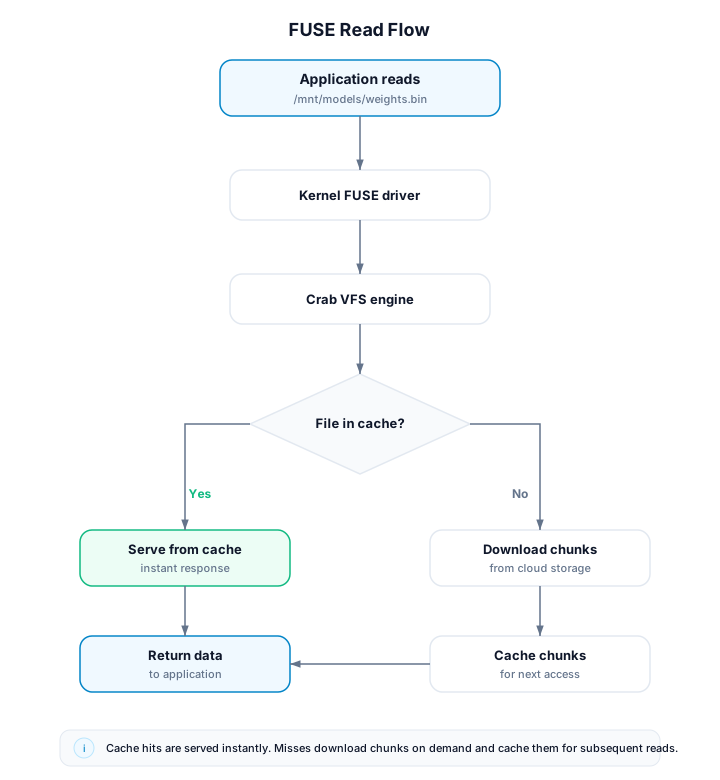
When you mount a repository:
- Directory structure comes from metadata: Crab builds a snapshot from Git tree objects.
lsandfinddo not require full file hydration. - File reads are on-demand — The first read of a file triggers chunk downloads. Subsequent reads are served from cache.
- Writes go to an overlay — Modified files are stored locally in an overlay layer until you explicitly commit or discard them.
- Backend selection is explicit when needed —
crab mountdefaults to--backend=auto, which prefers NFS. Use--backend=fusefor FUSE.
Mount a repository
Mount a remote repository
No prior clone needed — mount directly from cloud storage:
crab mount --repo crab://bucket/ml-models --mountpoint /mnt/modelsSelect a backend explicitly:
crab mount --repo crab://bucket/ml-models --mountpoint /mnt/models --backend=nfs
crab mount --repo crab://bucket/ml-models --mountpoint /mnt/models --backend=fuse
Files are immediately accessible:
ls /mnt/models/
cat /mnt/models/config.json
python -c "import torch; m = torch.load('/mnt/models/weights.bin')"
Mount a local branch
View another branch without switching your working tree:
crab mount --repo . --mountpoint /tmp/feature-view --ref=feature-branchUnmount
crab unmount --mountpoint /mnt/modelsRuntime Behavior
Multiple mounts can share local cache resources, so reading a file through one mount can make the same content faster to read elsewhere. Crab also prioritizes interactive reads over background prefetching, which keeps browsing responsive while larger files are loading.
You do not need to manage a background service manually. crab mount starts
what it needs, and unmounting the last active mount releases those resources.
NFS background mounts run in a crab-nfs-mount helper process. FUSE
background mounts use the coordinator-style mount mode. Crab also has
DaemonService mode for persistent named multi-repo mounts. See
Mount Modes when you need to decide between them.
Multiple Mounts
You can have multiple mounts active simultaneously:
crab mount --repo crab://bucket/repo-a --mountpoint /mnt/a
crab mount --repo crab://bucket/repo-b --mountpoint /mnt/b
crab mount --repo /srv/git/local-repo --mountpoint /tmp/main-view --ref=main
All use the same Crab mount cache layout. NFS starts one helper process per
mount; FUSE background mounts share the coordinator. Crab permits one active
mount for a given repo cache at a time; use crab mount switch or unmount
before opening another view of the same repo.
Managing Mounts
List active mounts
crab mount listCheck mount health
crab mount status --mountpoint /mnt/models
crab mount status --mountpoint /mnt/models --live-only --json
Use --live-only for scripts that must prove the NFS helper or FUSE
coordinator is answering now. Without it, status can fall back to persisted
metadata so you can inspect stale mounts.
Switch branch without unmounting
crab mount switch --mountpoint /mnt/models --ref=experiment-v3Force refresh from remote
crab mount refresh --mountpoint /mnt/modelsRead-Only vs. Read-Write
By default, mounts support writes through an overlay layer. Written files stay
local until you publish them with crab mount commit or discard them with
crab mount reset --overlay --yes. This keeps application writes isolated
from repository refs until you choose to create a commit.
Only one mount can use a repo cache at once, which keeps the cached Git
checkout, snapshot database, and overlay state unambiguous.
crab mount diff --mountpoint /mnt/view
crab mount commit --mountpoint /mnt/view -m "Update generated artifacts"
crab mount commit --mountpoint /mnt/view -m "Update generated artifacts" --push
For a strict read-only mount:
crab mount --repo crab://bucket/repo --mountpoint /mnt/view --read-onlyPerformance Characteristics
| Operation | Latency | Notes |
|---|---|---|
ls / directory listing | Metadata-only | Served from the in-memory snapshot |
| First read of a file | Network-dependent | Downloads chunks from cloud |
| Subsequent reads | Local disk speed | Served from chunk cache |
| Small files (< 1 MB) | ~50-200ms first read | Single chunk fetch |
| Large files (> 1 GB) | Streaming | Chunks fetched as read progresses |
Prerequisites
NFS backend (default)
macOS includes an NFS client. Linux needs the NFS client utilities:
# Ubuntu/Debian
sudo apt-get install nfs-common

# Fedora/RHEL
sudo dnf install nfs-utils
Linux host policy still controls the kernel mount syscall. On normal hosts
that may mean root or passwordless sudo; in containers it may mean
CAP_SYS_ADMIN.
Windows needs Client for NFS installed and mounts to a drive target:
crab mount --repo crab://bucket/repo --mountpoint Z:FUSE backend
macOS
brew install --cask macfuseApprove macFUSE in System Settings and reboot if prompted.
The rest of the Crab CLI works without macFUSE installed. The default NFS
backend also does not require macFUSE. Only crab mount --backend=fuse needs
macFUSE.
Linux FUSE (Ubuntu/Debian)
sudo apt-get install fuse3 libfuse3-devLinux FUSE (Fedora/RHEL)
sudo dnf install fuse3 fuse3-develVerify FUSE is available
ls /dev/fuseLimitations
- Network required for uncached reads — First access to a file needs cloud connectivity. Cached files work offline.
- Writes require explicit publish — The overlay is not transparent write-through. Use
crab mount commitorcrab daemon committo create a commit from overlay changes. - First-access latency — The first read of a large file has download latency. Use
crab fetchto pre-warm if needed. - Backend-specific OS policy — NFS depends on the native NFS client and mount permissions. FUSE depends on fuse3 or macFUSE. Windows uses NFS drive targets such as
Z:.
Mount vs. Hydrate: When to Use Which
| Use Case | Recommendation |
|---|---|
| Working on specific files (editing, training) | Hydrate — full local copy, no latency |
| Browsing or exploring a large repository | Mount for on-demand reads without an upfront full download |
| CI pipeline with known file list | Hydrate with manifest — predictable, cacheable |
| Viewing another branch | Mount — no working tree changes |
| IDE / editor access | Mount for browsing, hydrate for editing |
Troubleshooting
Stale mount (Transport endpoint not connected)
If the coordinator crashed:
crab unmount --all

# If that fails, use OS tools:
# Linux: fusermount3 -u /mnt/stale-mount
# macOS: umount -f /mnt/stale-mount
Permission denied on mountpoint
sudo mkdir -p /mnt/models && sudo chown $USER /mnt/modelsSlow first access
Pre-warm the cache for files you'll need:
crab fetch --include 'models/**'CLI Reference
For complete command syntax, all subcommands, and options, see the crab mount reference.