File Status
Every Crab-tracked file in your working tree is in one of three states: hydrated (full content on disk), pointer (dehydrated, content in cloud), or modified (hydrated with uncommitted changes). Understanding these states is key to working effectively with Crab.
File States
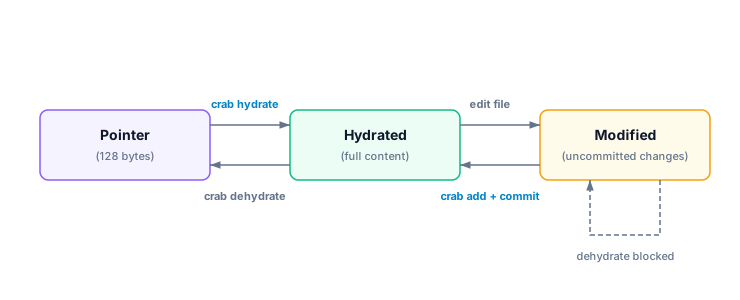
| State | Symbol | Meaning |
|---|---|---|
| Pointer | P | File is a lightweight stub. Content is in cloud storage. |
| Hydrated | H | Full content is on disk, matching the committed version. |
| Modified | M | Full content on disk, but differs from the committed pointer. |
Checking Status
crab statusTracked files (42 total):
H models/weights.bin 1.2 GB (hydrated)
H models/embeddings.bin 800 MB (hydrated)
P data/eval.safetensors 300 MB (pointer)
P data/test.safetensors 150 MB (pointer)
M config/vocab.bin 2.1 MB (modified)Separate Crab state from Git state
Git stores a Crab pointer in the index and passes working-tree content through the Crab clean filter when it computes status. A correctly configured filter can map unchanged hydrated bytes back to their pointer, so hydration alone does not imply an uncommitted Git change.
crab status reports a different question: whether the path is a pointer, has
full content with the committed size, or has full content with a different
size. Its M state is a size-based signal. A same-size content edit can still
require git status, git diff, or application-specific validation to detect.
| Observation | Meaning | Next check |
|---|---|---|
Crab P | Working tree contains a valid pointer | Hydrate before reading file bytes |
Crab H | Full content has the committed size | Use Git or a checksum for change detection |
Crab M | Full content size differs from the committed pointer | Review the edit before add or reset |
| Git reports modified after hydration | Clean-filter result differs or filter setup failed | Run crab why <path> and crab doctor |
Dehydrating can reduce checkout work before a branch change, but it should not be used to hide a real edit:
crab dehydrate --all
git status
crab dehydrate --all
git pull origin main
crab hydrate --all
Filtering by Pattern
# Check only model files
crab status '*.safetensors'

# Machine-readable output for scripting
crab status --porcelain
Porcelain output (one line per file):
p models/weights.bin
h models/embeddings.bin
m data/train.safetensors
Common Workflows
"Which files can I work with right now?"
crab status | grep "hydrated""What do I need to hydrate?"
crab status | grep "pointer""Do I have uncommitted changes in tracked files?"
crab status | grep "modified"Use git status --short as the final Git answer. Crab's state output explains
representation and expected size; it is not a byte-for-byte replacement for
Git change detection.
CLI Reference
For complete command syntax, porcelain format, and JSON output, see the crab status reference.